Consistent rounds
Scheduled routes through the parking areas and zones agreed for your site.
Rivo follows scheduled routes, reads license plates, and checks connected payment and permit records. Potential exceptions become documented records for your team to review. HireApp handles setup, maintenance, and supervision.
We run the fleet. You get the results.

Build patrol coverage around the times and areas that matter to your operation. Rivo handles repeatable checks so your team can focus on the exceptions that need attention.
Scheduled routes through the parking areas and zones agreed for your site.
Revisit vehicles and check parking status as sessions and permissions change.
Images, time, location, and the reason for a flag, brought together for review.
Rivo follows agreed routes through your parking areas, on a schedule built around your site.
Plate observations are checked against connected payment and permit records.
Potential exceptions are documented with images, time, location, and a reason for review.
Your team reviews the record and decides the appropriate follow-up.
Rivo brings mobile patrol and plate-reading cameras together to check vehicles across your parking areas. HireApp configures the routes, manages the equipment, and supervises the operation.
Rivo carries its cameras through your parking areas. We assess routes, charging, and connectivity around your existing site as part of deployment planning.
Read plates on either side of the patrol route.
Compare observations with connected payment and permit records.
Bring images, time, and location together for review.
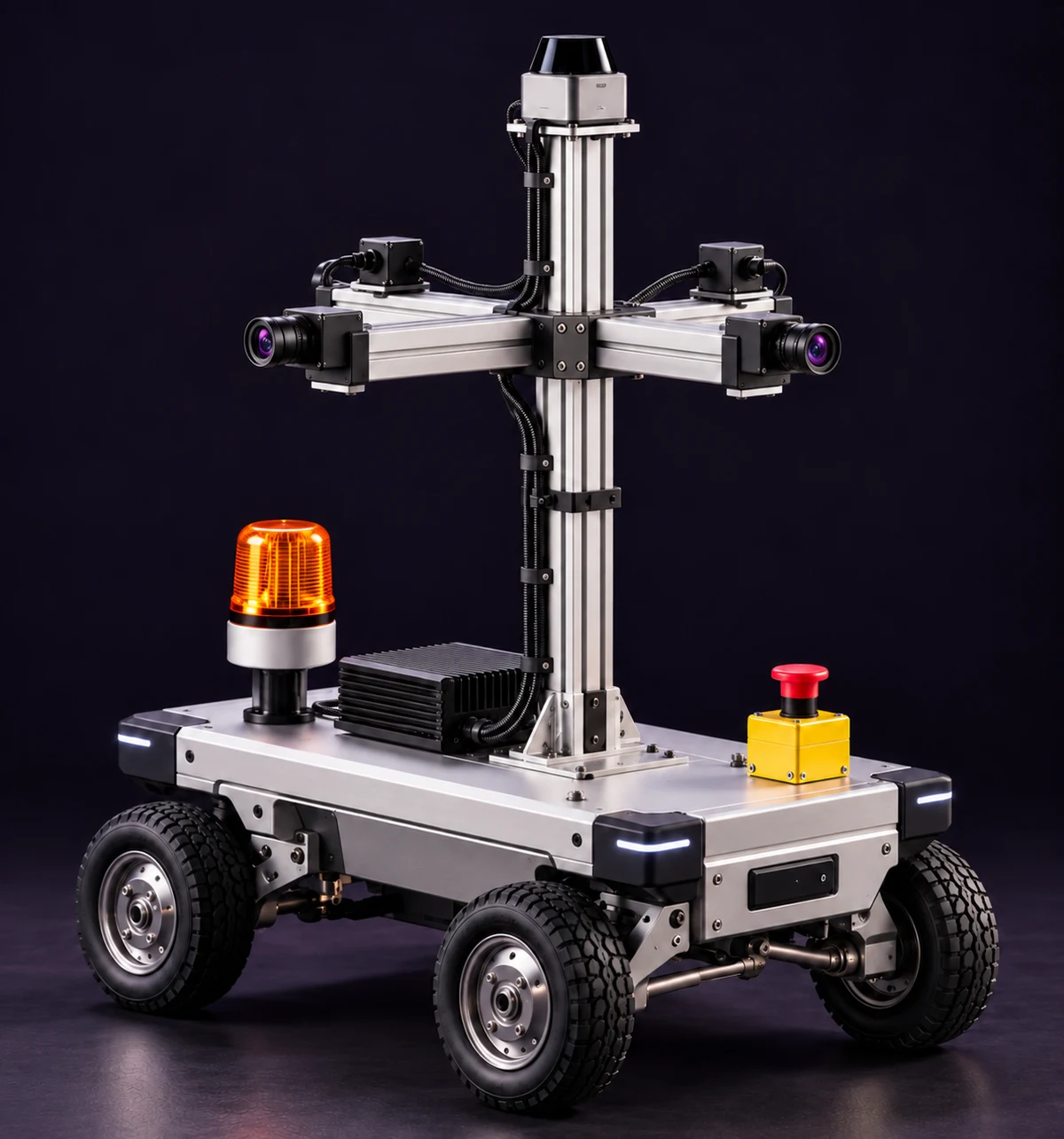
From a plate scan to a parking-status check and a record ready for review.
View the latest observed occupancy across your parking zones. See where vehicles are concentrated and which areas have available capacity as Rivo completes its rounds.
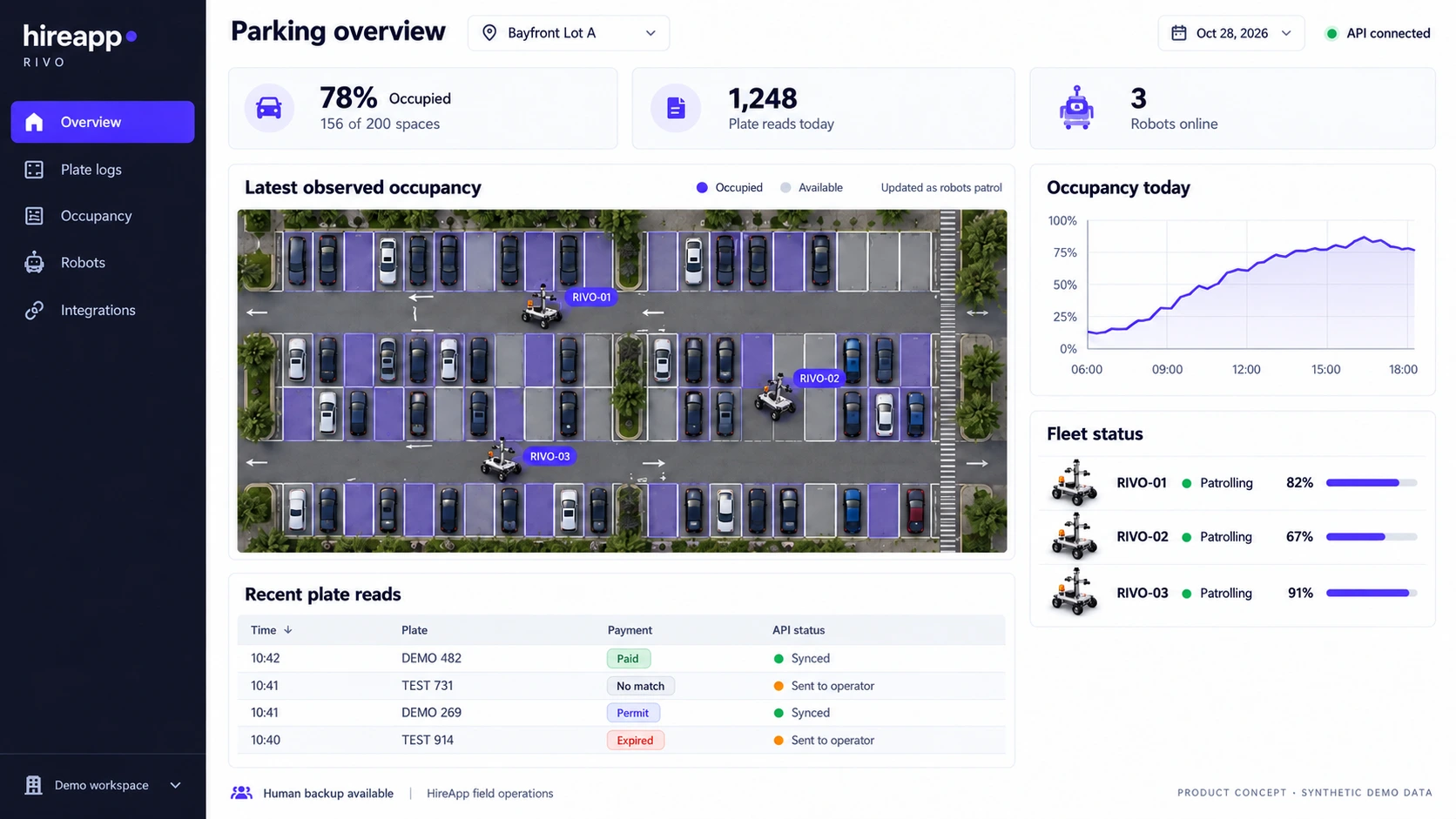
See the latest observed occupancy by parking zone, with updates gathered as Rivo completes its rounds.
Review captured plates and their parking-status checks.
See robot status and patrol activity across your site.
Bring the robot, route setup, maintenance, and operational supervision into one managed service. HireApp coordinates the patrol operation so your team can focus on running the property.
Equipment, coverage, support, and pricing are defined in the service scope agreed for your site.
Charging, maintenance, access restrictions, and escalation procedures are part of your deployment plan, with clear responsibilities when a patrol is interrupted.
Review flagged vehicles with supporting images, observation times, and parking-zone details, so your team can plan the next step with context.
Know where attention is needed.
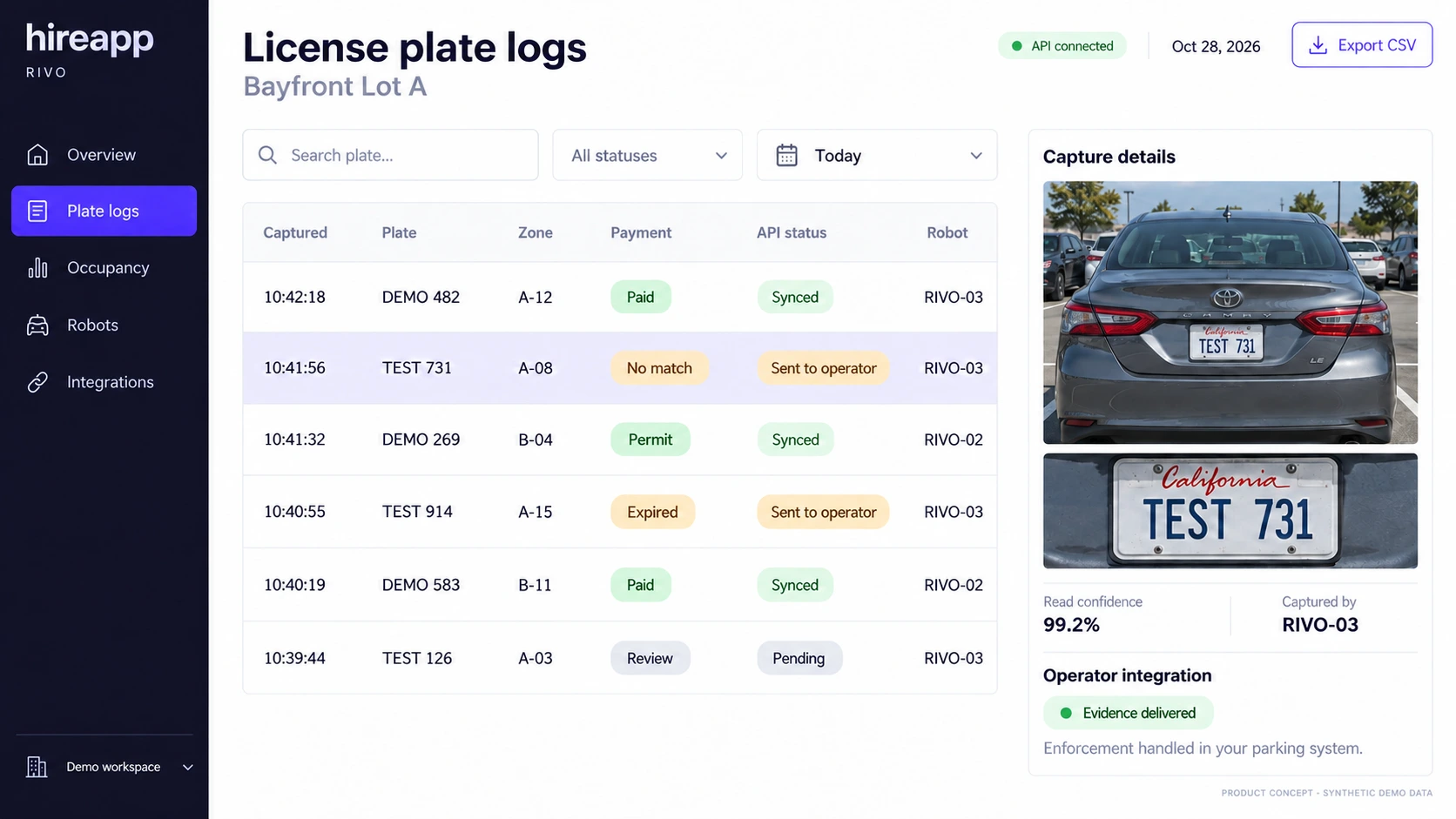
Payment, permit, and enforcement tools may be separate systems. We confirm the required data sources and connections for your site before deployment.
Bring the agreed parking-session and permit data into the checking process.
Compare observations with connected records and document potential exceptions with images, time, and location.
Pass flagged records into the agreed process for your team or enforcement partner to assess.
Check parked vehicles against connected payment records across designated rows.
Check permissions for each zone, from tenant allocations to staff permit areas. For example, a tenant permit can cover a reserved bay around the clock while visitor rows are checked against paid sessions.
Plan patrols around different areas, access requirements, and operating hours.
If the job means driving the same ground, looking closely, and writing down what you find, a wheeled robot can do it. Same robot, same workflow, new rules.
Scan every plate, check every session, issue violations with evidence.
Best forPrivate lots, campuses, HOAs, parking operators
After-hours rounds of lots, perimeters, and loading docks. Flags open gates, broken lights, and people in restricted areas, with a live view for your security team.
Best forWarehouses, corporate campuses, construction sites
Daily scan of every plate or VIN on the lot, mapped to its exact spot. Find missing units in minutes, not hours.
Best forCar dealerships, rental fleets, auction yards
Log trailer numbers, dock positions, and dwell time on every lap of the yard.
Best forDistribution centers, truck yards, ports
Keep fire lanes, EV chargers, accessible spaces, and loading zones clear.
Best forRetail centers, hospitals, office parks
Photo the same route every day. Track progress, spot damage, and catch problems early.
Best forSolar farms, construction sites, industrial yards
Have ground that needs covering? Tell us about the job
We use your site layout to plan patrol routes and explore operating scenarios in simulation before deployment. Access, charging, connectivity, and coverage requirements become part of the site plan.
Review parking areas, routes, surfaces, access, and operating needs, including charging and connectivity.
Explore routes and operating scenarios using a digital representation of your site before deployment.
Confirm system connections, the patrol schedule, and support arrangements so everyone knows what to expect.
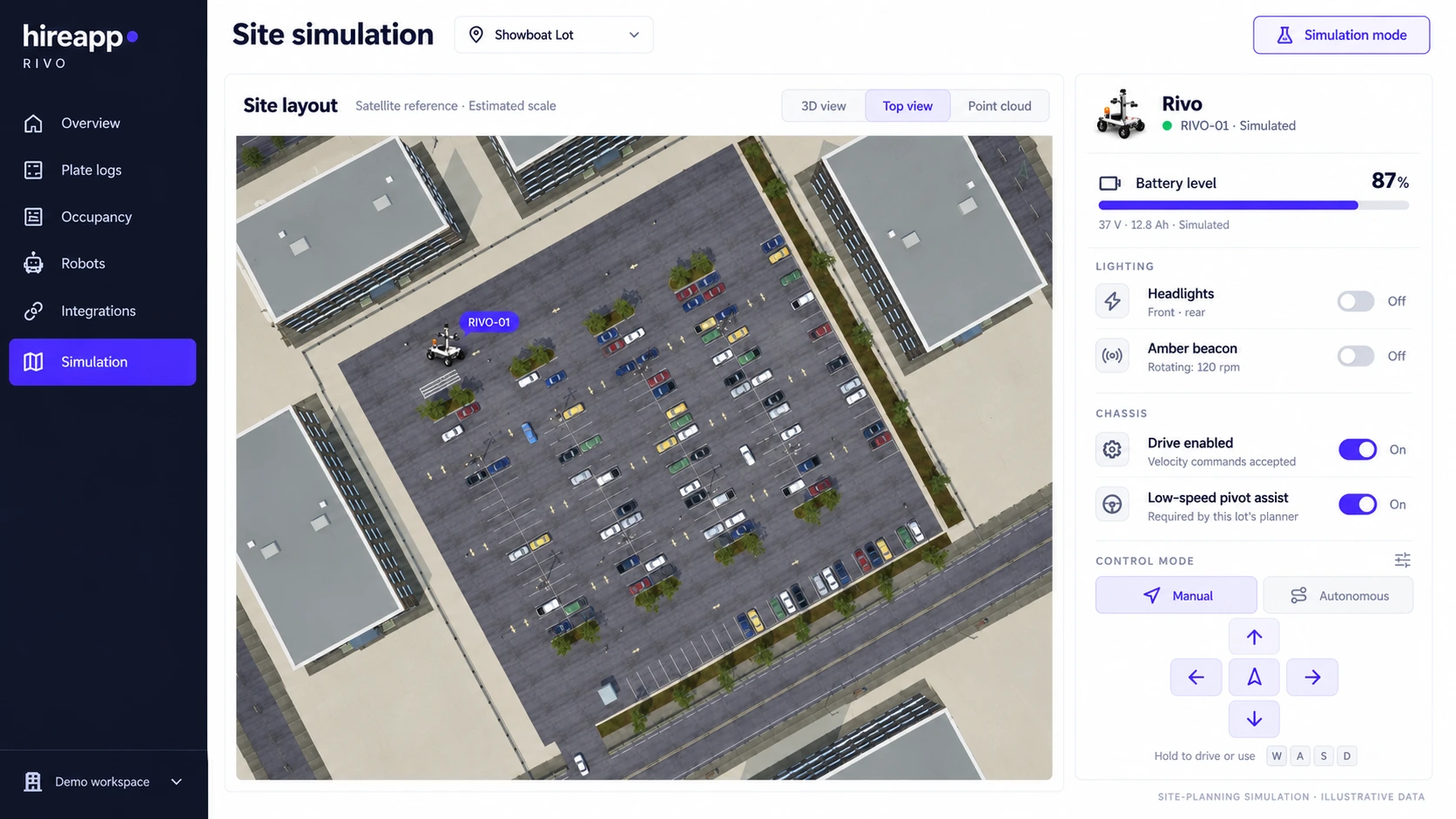
We assess charging space, power, connectivity, surfaces, and site access with you. Operating conditions, patrol schedules, and any property changes are agreed before deployment.
Setup, supervision, and what happens next.
HireApp provides robotic patrol as a managed service. You do not need to buy and operate the hardware yourself. Equipment, coverage, supervision, and pricing are defined in the service scope agreed for your property.
HireApp handles robot setup, route configuration, maintenance, technical support, and operational supervision. Your team provides property access, sets parking policies, and chooses the contacts responsible for review and enforcement.
We review the payment, permit, and enforcement systems used at your site and confirm the required connections before deployment. These may be separate systems, so the data sources, update requirements, and handoff process are agreed as part of setup.
Your parking team or enforcement partner controls the review and enforcement process, including whether a notice is issued. Rivo supplies observations and supporting records for the workflow agreed for your site. HireApp handles robot operations.
Patrol schedules are planned around your coverage needs and the selected robot’s charging requirements. We agree charging arrangements, operating hours, and coverage expectations as part of the site setup.
HireApp supervises robot operations and handles operational exceptions. The response to blocked routes, connection loss, and other interruptions is defined for the selected hardware and site before deployment, with escalation contacts agreed with your team.
Coverage depends on the layout, distances, access, charging requirements, and approved routes. We assess whether multiple areas can be included when planning your deployment.
We assess surfaces, slopes, lighting, charging space, power, connectivity, and access before deployment. Any equipment, system connections, or site changes needed for your property are identified and agreed during setup. You do not need to purchase the robot.
Where occupancy reporting is included in your service, it reflects the latest observations collected as Rivo patrols each zone. It is not a continuous view of every space. Update frequency depends on the route and patrol schedule agreed for your site.
Night patrol requirements and weather conditions are assessed during site planning. Lighting, visibility, surfaces, and the selected hardware determine the operating conditions and schedule agreed for your property.
Record access, permitted use, retention, and sharing with your parking or enforcement partners are defined in the service agreement. We agree who needs access and how records will be handled before deployment.
Tell us your property location, approximate parking-space count, current parking systems, and coverage needs. We will reply within one business day to discuss site suitability, service scope, and deployment timing.
Tell us about your parking areas, current systems, and coverage needs. We’ll discuss how Rivo could fit your operation.